 DP TOTP


Prerequisites
DP TOTP is a service provided by DP CLOUD. You need create DP CLOUD accounts (for free) before you can create apps or use the API. Follow the steps below to get started.
Create a DP CLOUD account
If you are not yet a DP CLOUD customer, go to the DP CLOUD Self-Service Subscription Portal and create an account.
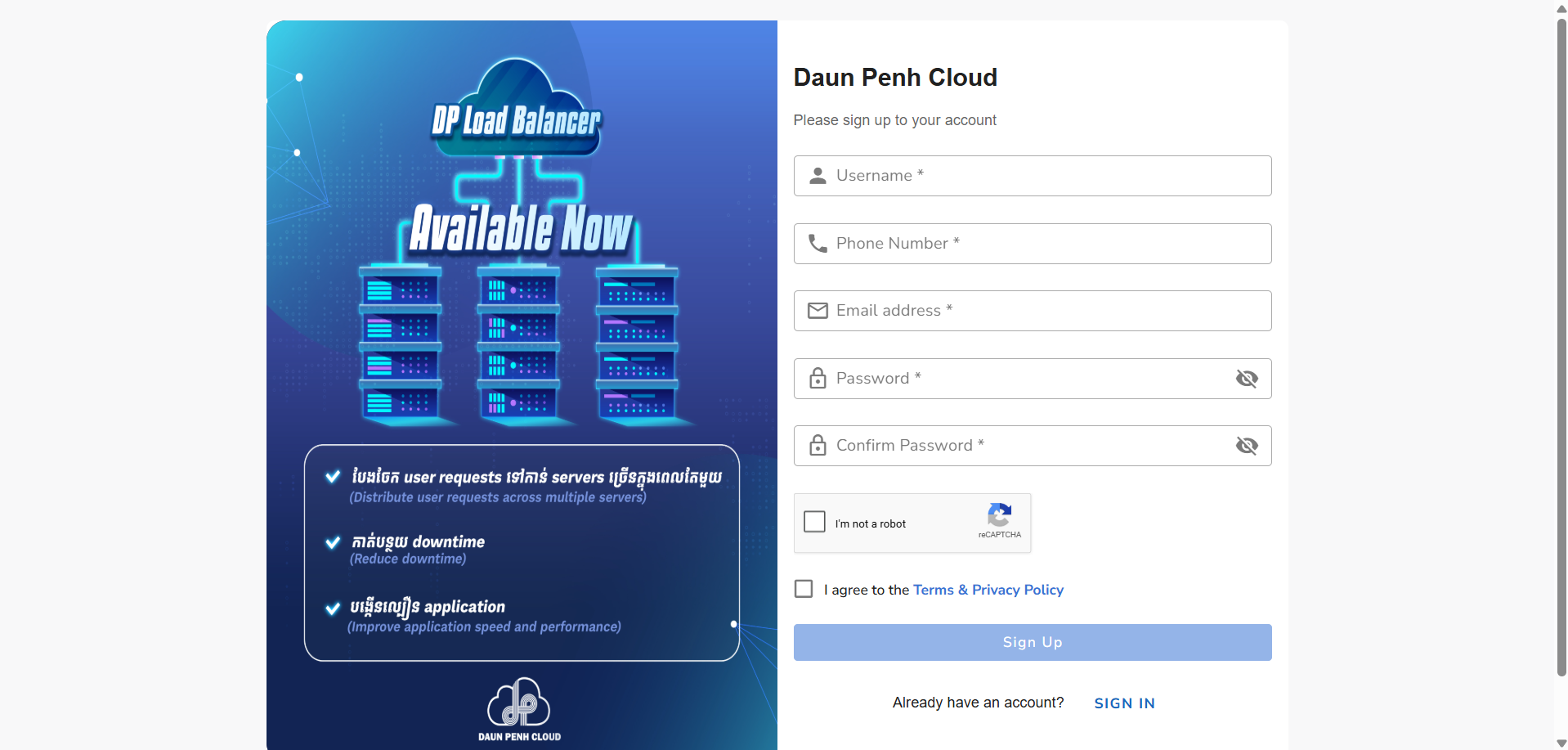
Log in to the Subscription Portal
Sign in to the DP CLOUD Subscription Portal using your email and password. After logging in, open the Applications menu from the main navigation bar.
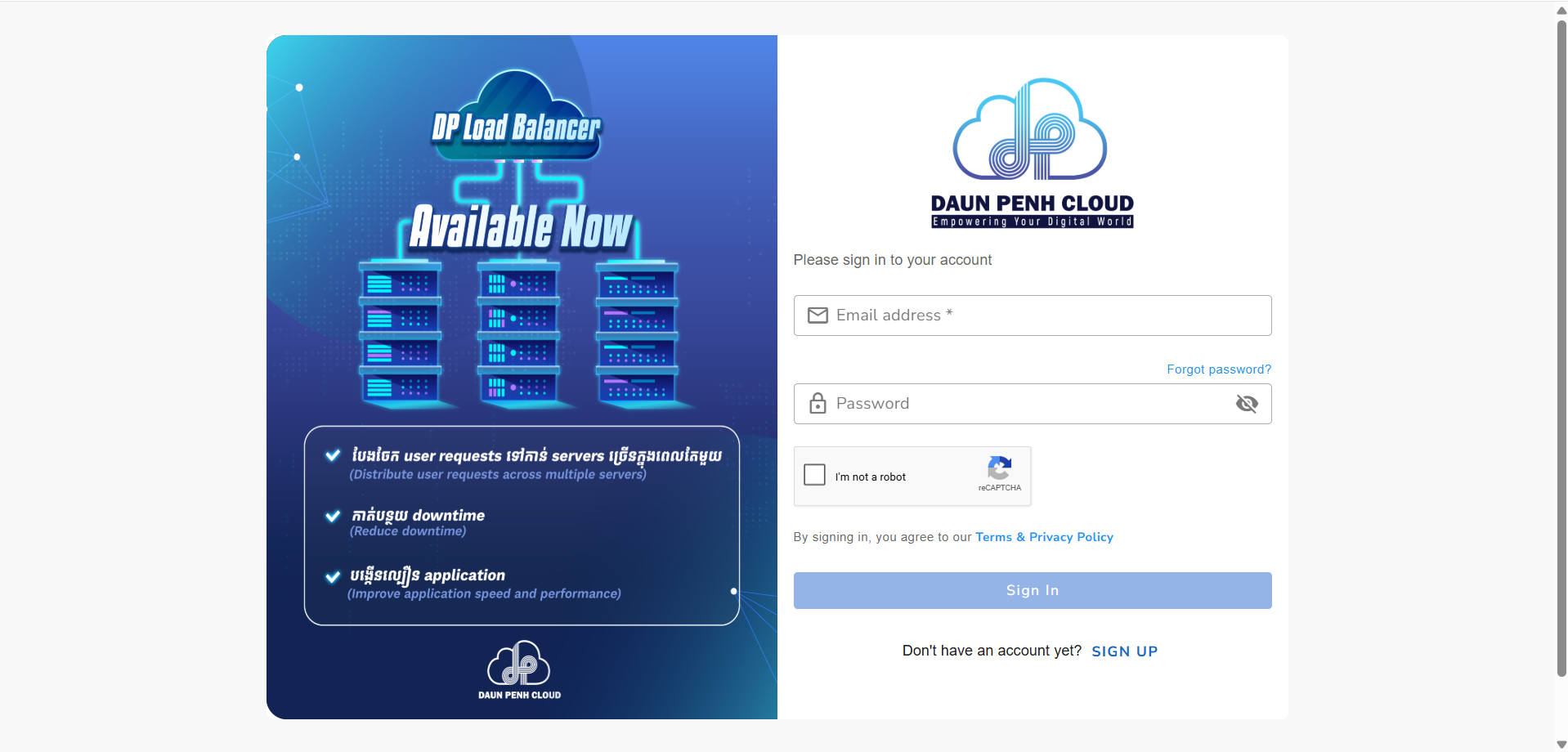
Verify your email
You will receive a verification code via email. Enter the code to verify your account before proceeding.
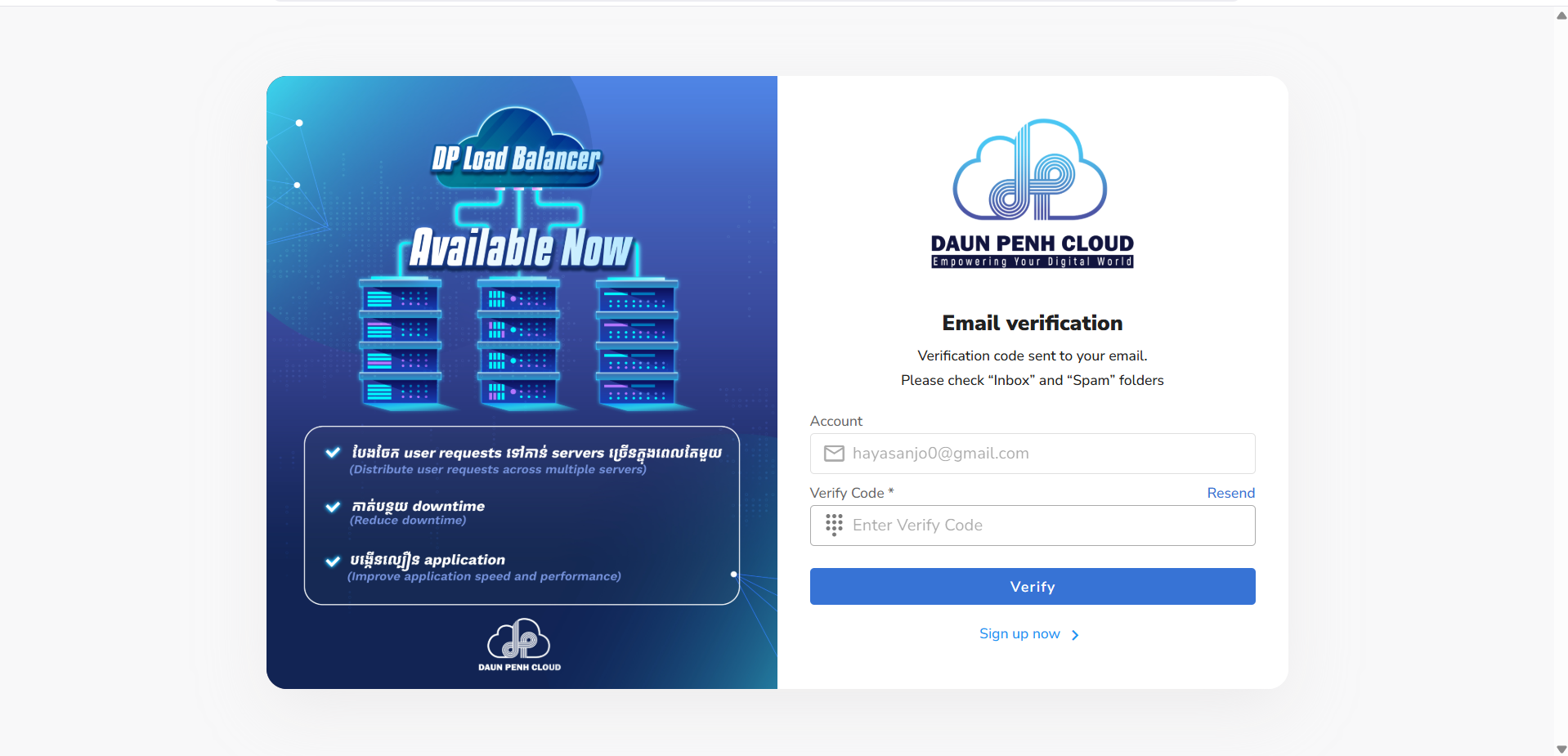
Add the TOTP service
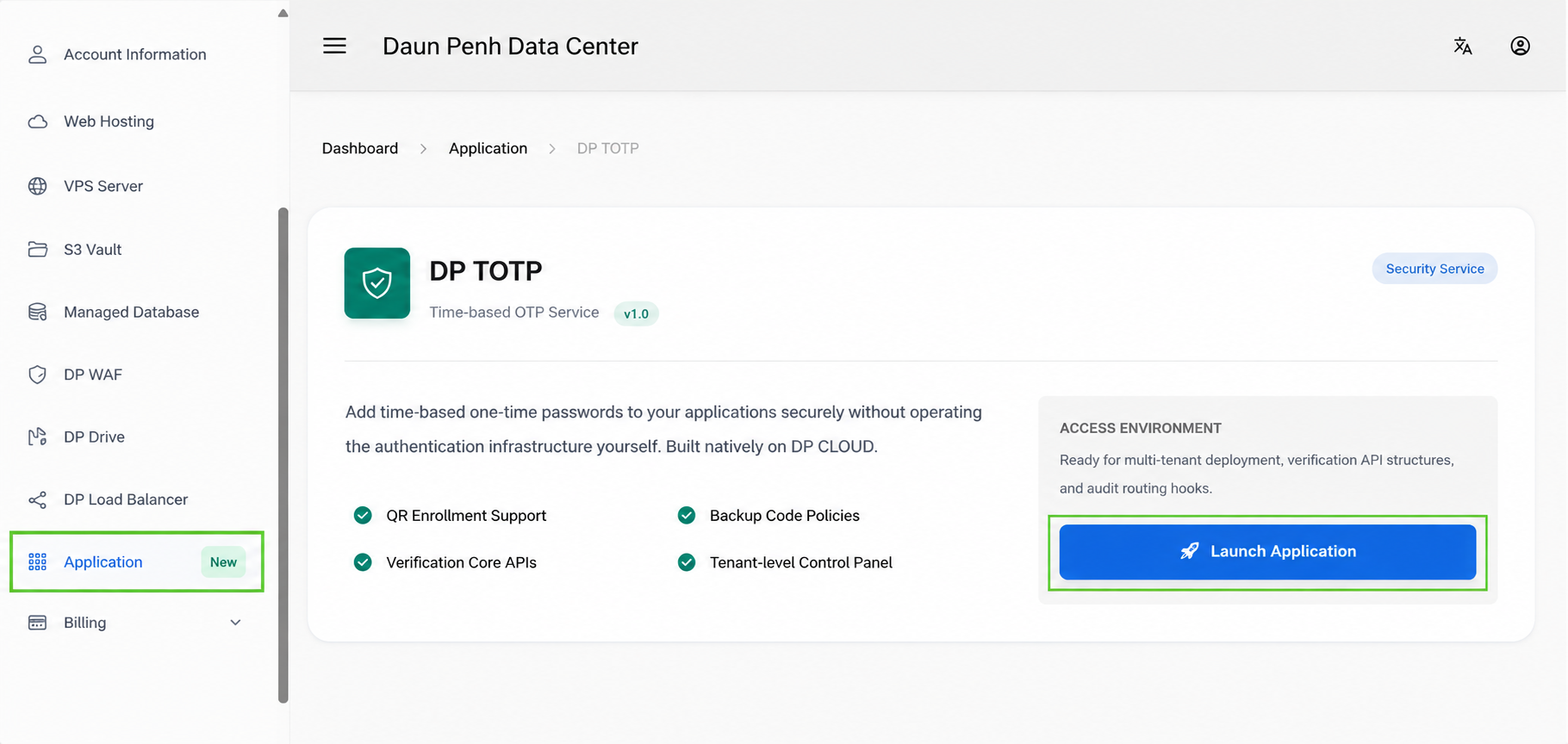
In the Applications menu, find DP TOTP and click the Select & Deploy button to add it to your subscription. The service will be provisioned for your account.
Launch DP TOTP Dashboard
Once the TOTP service is active, click Launch Application to open the DP TOTP Dashboard. This is where you can create apps, generate API keys, and manage your 2FA users.
Overview
DP TOTP acts as a 2FA-as-a-Service provider. You store your application's users by their ID; we store their TOTP secrets (AES-encrypted). You call our REST API to generate QR codes and verify codes - no crypto libraries needed in your app.
Base URL: https://otp.dpdatacenter.com
Create an app
Inside the DP TOTP Dashboard → My Apps → New App, give it a name and copy the api_key shown once after creation. No API call needed.
Setup a user
Call POST /api/v1/totp/setup with the user's ID and email. You'll receive a QR code SVG to display.
User scans QR
The user scans the QR with Google Authenticator, Authy, or any RFC 6238 app.
Confirm first code
Call POST /api/v1/totp/verify_setup with the first code the user enters. This enables 2FA for them.
Check 2FA status on login
After validating the user's password, call GET /api/v1/totp/status. If two_factor_enabled is false, grant the session immediately. If true, proceed to step 6.
Verify OTP on login
Show the 6-digit OTP challenge and call POST /api/v1/totp/verify. Grant the session only on "status": "verified".
Web Dashboard
The web UI at /apps is the easiest way to manage your apps and monitor usage without making any API calls.
Creating an App
Go to Dashboard → My Apps → New App, enter a name, and click Create App.
You can find the API key in the Manage App dashboard since the app has a copy button. Copy it immediately and store it in your app's environment variables. Use it as X-API-KEY on all subsequent requests.
Usage & Users Chart
Each app has a detail page (/apps/:id) showing:
- 4 stat cards — Total Users, Total Verifications, Success Rate, Today
- 30-day dual-axis line chart — daily verifications (left axis, blue) and new user enrollments (right axis, green)
- External Users list — all
exuser-role accounts enrolled via this app's API key, with delete support
The chart data loads asynchronously from GET /apps/:id/stats so the page renders immediately.
AI Prompt
Paste this prompt into any AI assistant - ChatGPT, Claude, Gemini, Copilot, etc. Replace [YOUR FRAMEWORK] and [YOUR LANGUAGE] with your stack. The AI will generate a complete, ready-to-use integration.
I'm integrating DP TOTP 2FA into my app. Please generate a complete implementation.

== CRITICAL: ANALYZE MY CODEBASE FIRST ==
Before writing any code, read through my existing codebase and identify:
- The UI component library / design system already in use (e.g. Tailwind, Bootstrap, shadcn/ui,
  MUI, Ant Design, custom CSS classes) — reuse its buttons, inputs, alerts, modals, cards, etc.
- The existing auth flow (session, JWT, cookie) so the 2FA steps slot in seamlessly.
- The existing form patterns (validation, error display, loading states) — match them exactly.
- The existing routing conventions so new routes follow the same structure.
- Any existing HTTP client / API wrapper (Axios instance, fetch helper, HttpClient service, etc.)
  — use it instead of creating a new one.
Do NOT introduce new UI libraries, utility classes, or design patterns that are not already
present in the codebase. Every new screen and component must look and feel native to the app.

== SERVICE OVERVIEW ==
DP TOTP is a TOTP-as-a-Service REST API for adding 2FA to any application.
Base URL:    https://otp.dpdatacenter.com
Auth header: X-API-KEY: <your-api-key>   ← keep this server-side, never expose to the browser

== ENDPOINTS ==

1. Setup 2FA for a user
   POST /api/v1/totp/setup
   Headers: X-API-KEY, Content-Type: application/json
   Body:    { "external_user_id": "<your-app-user-id>", "email": "<user@example.com>" }
   ⚠ CLIENT GUARD: The route in your app that triggers this call must be protected.
     Only allow it if the user is authenticated. If the user already has 2FA enabled,
     confirm they have passed the OTP challenge in the current session before calling setup.
  Returns on first setup:
  {
    "status": "setup_required",
    "external_user_id": "<id>",
    "otp_secret": "<manual-entry-secret>",
    "qr_code_svg": "<svg>...</svg>",
    "message": "..."
  }
  Returns if user already enabled 2FA:
  {
    "status": "already_enabled",
    "external_user_id": "<id>",
    "message": "2FA already active for this user"
  }
   → Render qr_code_svg as HTML so the user can scan it in their authenticator app.
  → If status = already_enabled, do NOT start setup again; show the existing-enabled state in the UI.

2. Confirm setup (first OTP verification — must be done once to activate 2FA)
   POST /api/v1/totp/verify_setup
   Body:    { "external_user_id": "<id>", "otp_code": "<6 digits>" }
  Returns:
  {
    "status": "enabled",
    "message": "...",
    "recovery_codes": ["ABCD-EFGH-IJKL-MNOP", "..."],
    "recovery_codes_count": 8
  }
   → 2FA is NOT active for the user until this succeeds.
  → Display the recovery codes immediately and tell the user to save them because plaintext is only returned when generated/regenerated.

3. Verify OTP on login
   POST /api/v1/totp/verify
   Body:    { "external_user_id": "<id>", "otp_code": "<6 digits>" }
  Returns 200:
  {
    "status": "verified",
    "message": "..."
  }
  Returns 422: { "status": "invalid_code", "message": "..." }
   → Call during the login challenge. Complete the session only on 200.

4. Verify a recovery code on login fallback
  POST /api/v1/totp/verify_recovery
  Body:    { "external_user_id": "<id>", "recovery_code": "<backup-code>" }
  Returns 200:
  {
    "status": "verified",
    "message": "...",
    "recovery_codes_remaining": 7
  }
  Returns 422: { "status": "invalid_code", "message": "..." }
  → Use this when the user cannot access their authenticator app.

5. Check 2FA status
   GET /api/v1/totp/status?external_user_id=<id>
  Returns: { "external_user_id": "<id>", "two_factor_enabled": true/false, "recovery_codes_remaining": 8, "status": "enabled/not_enabled" }
   → Use on login to decide whether to show the OTP challenge screen.

6. List recovery-code metadata
  GET /api/v1/totp/recovery_codes?external_user_id=<id>
   ⚠ CLIENT GUARD: Protect this route. The user must be authenticated AND must have
     already passed the 2FA OTP challenge in the current session before you call this.
  Returns: { "external_user_id": "<id>", "recovery_codes_remaining": 7, "codes": [{ "masked_code": "ABCD-EFGH-****", "used": false, "used_at": null }] }

7. Regenerate recovery codes
  POST /api/v1/totp/recovery_codes/regenerate
   ⚠ CLIENT GUARD: Same as above — require authenticated + 2FA-verified session.
   🔒 SERVER GUARD: otp_code is required — the server validates the live OTP before regenerating.
  Body:    { "external_user_id": "<id>", "otp_code": "<6-digit code>" }
  Returns:
  {
    "status": "regenerated",
    "message": "...",
    "recovery_codes": ["ABCD-EFGH-IJKL-MNOP", "..."],
    "recovery_codes_count": 8
  }
  // Wrong OTP → 422: { "status": "invalid_code", "message": "OTP code is incorrect or expired" }

8. Disable 2FA
   DELETE /api/v1/totp/disable
   ⚠ CLIENT GUARD: Require the user to be authenticated AND to have passed the 2FA
     OTP challenge in the current session before your app forwards this request.
  Body:    { "external_user_id": "<id>" }
   Returns: { "status": "disabled", "message": "..." }

== MY STACK ==
Framework: [REPLACE — e.g. Laravel, Next.js, Django, Express, Rails, etc.]
Language:  [REPLACE — e.g. PHP, TypeScript, Python, JavaScript, Ruby, etc.]

== WHAT I NEED ==
Please provide:
1. A server-side proxy/service layer that attaches X-API-KEY and calls the DP TOTP API endpoints from my backend, so the secret API key is never exposed to the client
2. Setup flow: call setup → handle already_enabled vs setup_required → display QR/manual secret → user enters first code → confirm activation
   - Use my existing card/modal/page layout components for the UI
   - Use my existing form inputs, buttons, and error display patterns
  - If setup returns already_enabled, show a clear “2FA already enabled” state instead of regenerating a QR code
  - After verify_setup succeeds, render and persist the returned recovery codes in the UX once
3. Login flow:
   a. Validate password in your own auth system
   b. Call GET /api/v1/totp/status?external_user_id=<id>
      - If two_factor_enabled = false → grant session immediately (no OTP needed)
    - If two_factor_enabled = true  → show OTP challenge screen with a recovery-code fallback option
  c. User submits 6-digit code → POST /api/v1/totp/verify
      - On { "status": "verified" } → complete login and grant session
      - On 422 → show error and ask user to retry
  d. If the user cannot access the authenticator app, allow POST /api/v1/totp/verify_recovery instead
    - On { "status": "verified" } → complete login and grant session
    - Show remaining recovery-code count after a successful fallback
   - Render the OTP input using the same input/form components used elsewhere in the app
4. Route/middleware guard to protect pages that require completed 2FA
   - Protect pages that should only be accessible after the user completes your normal 2FA login challenge
   - The following routes/actions in YOUR app must additionally check that the user has
     already passed the OTP challenge in the current session before calling the DP TOTP API:
       • The action that calls POST /api/v1/totp/setup
       • The action that calls GET  /api/v1/totp/recovery_codes
       • The action that calls POST /api/v1/totp/recovery_codes/regenerate
       • The action that calls DELETE /api/v1/totp/disable
   - Implement this as a reusable middleware/before_action/guard in your framework
     that checks session[:otp_verified] (or equivalent) and returns 403 / redirects
     to the OTP challenge if the flag is missing
5. Disable 2FA flow (e.g. from account settings page)
   - Render inside my existing settings page layout, not a standalone page
6. Recovery-code management UI
  - Show saved-code guidance after enable/regenerate
  - Show masked-code list and remaining count from GET /api/v1/totp/recovery_codes
  - Regenerate only after recent 2FA verification

== UI INTEGRATION RULES ==
- Import and compose existing components — never create parallel ones with different naming.
- Use the same CSS class names, spacing tokens, and colour variables already in the project.
- Match loading-state, disabled-state, and error-state patterns already used in other forms.
- If the project uses a component library, use its <Button>, <Input>, <Alert>, <Card>, etc.
- Keep file/folder placement consistent with the project's existing directory conventions.
You can also ask the AI to adapt the Code Examples shown further down this page to your specific project structure, authentication library, or database schema.
Full Flow Diagram
[ User registers in your app ]
         ↓
POST /api/v1/totp/setup  ← external_user_id + email
         ↓
Returns QR code SVG or { "status": "already_enabled" }  ← branch your UI accordingly
         ↓
User scans QR with Google / Microsoft Authenticator
         ↓
POST /api/v1/totp/verify_setup  ← external_user_id + first OTP code
         ↓
{ "status": "enabled", "recovery_codes": [...] }  ← save 8 recovery codes immediately

━━━━━━━━━━━━━━  Recovery fallback  ━━━━━━━━━━━━━━━━

GET /api/v1/totp/recovery_codes  ← list masked codes + remaining count
         ↓
POST /api/v1/totp/verify_recovery  ← external_user_id + recovery_code
         ↓
{ "status": "verified" }  ← allow login if authenticator is unavailable
         ↓
GET /api/v1/totp/recovery_codes  ← list masked codes + remaining count
         ↓
POST /api/v1/totp/recovery_codes/regenerate  ← replace all unused codes with a fresh set
         ↓
DELETE /api/v1/totp/disable  ← disable 2FA when the user chooses

━━━━━━━━━━━━━━  On every login  ━━━━━━━━━━━━━━━━

User enters email + password  ← validate in your own auth system
         ↓
GET /api/v1/totp/status  ← external_user_id as query param
         ↓
{ "two_factor_enabled": false }  → skip OTP, grant session directly
{ "two_factor_enabled": true  }  → proceed to OTP challenge ↓
         ↓
Show 6-digit OTP input form + recovery-code fallback
         ↓
POST /api/v1/totp/verify  ← external_user_id + otp_code
         ↓
{ "status": "verified" }  ← grant session / issue JWT token
Always resolve external_user_id on the server — never trust it from a frontend request. Read the ID from your authenticated session or database. For example: Laravel — auth()->id(), Django — request.user.id, Express — req.user.id (from your JWT/session middleware). Accepting a user-supplied ID from a form or query string lets any user impersonate another.
Setup User
Registers a user in the TOTP system and returns a QR code SVG + raw secret for display in your UI. Calling this again re-generates the secret (useful if user wants to re-enroll).
This endpoint returns the TOTP secret and QR code. Without a guard, anyone with a valid session could silently re-bind the user's authenticator.
- User is authenticated (valid session / JWT).
- If
GET /api/v1/totp/statusreturnstwo_factor_enabled: true, the user must have already passed the OTP challenge this session (e.g.session[:totp_verified] == true).
Add a before_action / middleware on your setup action that checks the status endpoint. If 2FA is active and the session flag is absent, redirect to your OTP-verify page first.
| Body Param | Type | Required | Description |
|---|---|---|---|
| external_user_id | string | required | Your app's user ID (any string) |
| string | required | Shown as label in authenticator app |
// First-time or reset setup
{
  "status": "setup_required",
  "external_user_id": "user-123",
  "otp_secret": "JBSWY3DPEHPK3PXP",   // show as manual entry fallback
  "qr_code_svg": "<svg ...>...</svg>",  // embed directly in your HTML
  "message": "Scan QR or enter secret in authenticator app, then call /verify_setup"
}

// Already enabled
{
  "status": "already_enabled",
  "external_user_id": "user-123",
  "message": "2FA already active for this user"
}
Verify Setup
Confirms the first OTP code after the user scans the QR. This activates 2FA for the user. Must be called once before verify will work.
| Body Param | Type | Required | Description |
|---|---|---|---|
| external_user_id | string | required | Your app's user ID |
| otp_code | string | required | 6-digit code from authenticator app |
// Success
{
  "status": "enabled",
  "message": "2FA successfully enabled",
  "recovery_codes": ["ABCD-EFGH-IJKL-MNOP", "..."],
  "recovery_codes_count": 8
}

// Invalid code
{ "status": "invalid_code", "message": "OTP code is incorrect or expired" }  // HTTP 422

// Already enabled
{ "status": "already_enabled", "message": "2FA already active" }
Recovery codes are shown only once. The recovery_codes array is returned only in this response. Display them to the user immediately and prompt them to save the codes before navigating away. If they lose them without saving, they must regenerate via POST /api/v1/totp/recovery_codes/regenerate (requires a live OTP code).
Verify OTP
Verifies a 6-digit OTP code during login. Call this after validating the user's password. Grant session / issue JWT only if status == "verified".
| Body Param | Type | Required | Description |
|---|---|---|---|
| external_user_id | string | required | Your app's user ID |
| otp_code | string | required | 6-digit code from authenticator app |
// Success
{
  "status": "verified",
  "message": "OTP verified successfully"
}

// Failure
{ "status": "invalid_code", "message": "OTP code is incorrect or expired" }  // HTTP 422
Recovery Codes
Recovery codes are one-time fallback codes for users who cannot access their authenticator app. verify_setup now returns the initial 8 codes, verify_recovery lets you complete login with one code, recovery_codes lists masked status, and recovery_codes/regenerate replaces any unused codes with a fresh set.
Typical usage: if the user has already passed your normal password check but no longer has their phone or authenticator app, show the same 2FA challenge screen with a fallback field for a saved recovery code.
Validate password first
Your app still validates the user's normal email/password or primary login credentials before any 2FA challenge starts.
Show the 2FA challenge
Call GET /api/v1/totp/status. If two_factor_enabled is true, show the normal OTP form and a fallback recovery-code input.
Use a recovery code when OTP is unavailable
If the user lost their phone or deleted the authenticator app, submit one saved code to POST /api/v1/totp/verify_recovery instead of verify.
Treat it as one-time only
A successful recovery-code login consumes that code immediately. It cannot be reused, and the remaining count drops by one.
| Body Param | Type | Required | Description |
|---|---|---|---|
| external_user_id | string | required | Your app's user ID |
| recovery_code | string | required | One unused recovery code generated during setup or regeneration |
{
  "status": "verified",
  "message": "Recovery code verified successfully",
  "recovery_codes_remaining": 7
}Recovery codes bypass the OTP challenge entirely. Exposing or regenerating them without proof of identity lets an attacker steal or invalidate the user's backup access.
- User is authenticated in your app.
- User has passed the OTP challenge this session (
session[:totp_verified] == true). Don't rely on the login session alone. - For regenerate: treat like a password-change — optionally re-prompt for the OTP code immediately before regenerating.
Add a shared before_action / middleware to both controller actions that checks the verified-session flag and redirects to the OTP-challenge page if it is missing.
{
  "external_user_id": "user-123",
  "recovery_codes_remaining": 7,
  "codes": [
    { "masked_code": "ABCD-EFGH-****", "used": false, "used_at": null }
  ]
}| Body Param | Type | Required | Description |
|---|---|---|---|
| external_user_id | string | required | Your app's user ID |
| otp_code | string | required | Current 6-digit OTP from the user's authenticator app. Must be valid to proceed. |
// Success
{
  "status": "regenerated",
  "message": "Recovery codes regenerated successfully",
  "recovery_codes": ["ABCD-EFGH-IJKL-MNOP", "..."],
  "recovery_codes_count": 8
}

// Wrong / expired OTP  →  422
{ "status": "invalid_code", "message": "OTP code is incorrect or expired" }
Status
Check whether a user has 2FA enabled. Useful to decide whether to show the OTP input during login.
{
  "external_user_id": "user-123",
  "two_factor_enabled": true,
  "recovery_codes_remaining": 8,
  "status": "enabled"

// When 2FA is off, status becomes "not_enabled"
}
Disable 2FA
Disables 2FA for a user. The TOTP secret is kept in the database but otp_required_for_login is set to false. You can re-enable by calling setup + verify_setup again.
Disabling 2FA without re-verification is a critical bypass. An attacker with brief session access could permanently remove 2FA without the user's knowledge.
- User is authenticated in your app.
- User has just verified their OTP code in the current flow — call
POST /api/v1/totp/verifyand only proceed ifstatus: "verified"is returned. - Do not rely on a stale session flag; require a fresh verify call specifically for this action.
Show a confirmation page that prompts for the current OTP code. Submit it to POST /api/v1/totp/verify first — only on success forward the disable request to DELETE /api/v1/totp/disable.
| Body Param | Type | Required | Description |
|---|---|---|---|
| external_user_id | string | required | Your app's user ID |
{ "status": "disabled", "message": "2FA has been disabled" }Laravel (PHP)
Uses Laravel's built-in Http facade (Laravel 7+).
Enable 2FA - show QR code
use Illuminate\Support\Facades\Http;

public function showSetup(Request $request)
{
    $response = Http::withHeaders([
        'X-API-KEY' => env('TOTP_API_KEY'),
    ])->post(env('TOTP_BASE_URL') . '/api/v1/totp/setup', [
        'external_user_id' => (string) auth()->id(),
        'email'            => auth()->user()->email,
    ]);

    $data = $response->json();
    return view('2fa.setup', ['qr' => $data['qr_code_svg']]);
}

{{-- In your Blade template --}}
{!! $qr !!}
Confirm first code
public function confirmSetup(Request $request)
{
    $response = Http::withHeaders(['X-API-KEY' => env('TOTP_API_KEY')])
        ->post(env('TOTP_BASE_URL') . '/api/v1/totp/verify_setup', [
            'external_user_id' => (string) auth()->id(),
            'otp_code'         => $request->input('otp_code'),
        ]);

    if ($response->json('status') === 'enabled') {
        $codes = $response->json('recovery_codes'); // ⚠ shown only once — pass to view now
        return view('2fa.setup-complete', ['codes' => $codes]);
    }

    return back()->withErrors(['otp_code' => 'Invalid code, try again.']);
}
{{-- resources/views/2fa/setup-complete.blade.php --}}
<h2>✅ 2FA Enabled</h2>
<p>Save these recovery codes now — they will <strong>not be shown again</strong>.</p>
<ul>
@foreach ($codes as $code)
<li><code>{{ $code }}</code></li>
@endforeach
</ul>
<a href="/dashboard">Continue to dashboard</a>Verify on login
public function login(Request $request)
{
    // 1. Validate credentials
    if (!Auth::attempt($request->only('email', 'password'))) {
        return back()->withErrors(['email' => 'Invalid credentials.']);
    }
    $user = Auth::user();

    // 2. Check 2FA status via DP TOTP status API
    $statusRes = Http::withHeaders(['X-API-KEY' => env('TOTP_API_KEY')])
        ->get(env('TOTP_BASE_URL') . '/api/v1/totp/status', [
            'external_user_id' => (string) $user->id,
        ]);
    $twoFactorEnabled = $statusRes->json('two_factor_enabled');

    if ($twoFactorEnabled) {
        Auth::logout();
        session(['pending_user_id' => $user->id]);
        return redirect()->route('2fa.challenge');
    }

    return redirect()->intended('/dashboard');
}

public function challenge(Request $request)
{
    $userId   = session('pending_user_id');
    $response = Http::withHeaders(['X-API-KEY' => env('TOTP_API_KEY')])
        ->post(env('TOTP_BASE_URL') . '/api/v1/totp/verify', [
            'external_user_id' => (string) $userId,
            'otp_code'         => $request->input('otp_code'),
        ]);

    if ($response->json('status') === 'verified') {
        Auth::loginUsingId($userId);
        return redirect()->intended('/dashboard');
    }

    return back()->withErrors(['otp_code' => 'Invalid or expired code.']);
}
Verify via recovery code
public function verifyRecovery(Request $request)
{
    $userId   = session('pending_user_id');
    $response = Http::withHeaders(['X-API-KEY' => env('TOTP_API_KEY')])
        ->post(env('TOTP_BASE_URL') . '/api/v1/totp/verify_recovery', [
            'external_user_id' => (string) $userId,
            'recovery_code'    => $request->input('recovery_code'),
        ]);

    if ($response->json('status') === 'verified') {
        Auth::loginUsingId($userId);
        return redirect()->intended('/dashboard');
    }

    return back()->withErrors(['recovery_code' => 'Invalid or already-used recovery code.']);
}
View recovery codes
public function recoveryCodes(Request $request)
{
    $response = Http::withHeaders(['X-API-KEY' => env('TOTP_API_KEY')])
        ->get(env('TOTP_BASE_URL') . '/api/v1/totp/recovery_codes', [
            'external_user_id' => (string) auth()->id(),
        ]);

    return view('2fa.recovery', ['data' => $response->json()]);
    // data.codes = [{ masked_code, used }, ...]
    // data.recovery_codes_remaining = integer
}
Regenerate recovery codes
public function regenerateCodes(Request $request)
{
    $response = Http::withHeaders(['X-API-KEY' => env('TOTP_API_KEY')])
        ->post(env('TOTP_BASE_URL') . '/api/v1/totp/recovery_codes/regenerate', [
            'external_user_id' => (string) auth()->id(),
            'otp_code'         => $request->input('otp_code'), // ← live OTP required
        ]);

    if ($response->json('status') === 'regenerated') {
        // recovery_codes shown only once — pass to view immediately
        return view('2fa.new-codes', ['codes' => $response->json('recovery_codes')]);
    }

    return back()->withErrors(['otp_code' => 'Invalid OTP — regeneration denied.']);
}
Disable 2FA
public function disable(Request $request)
{
    $response = Http::withHeaders(['X-API-KEY' => env('TOTP_API_KEY')])
        ->delete(env('TOTP_BASE_URL') . '/api/v1/totp/disable', [
            'external_user_id' => (string) auth()->id(),
        ]);

    if ($response->json('status') === 'disabled') {
        auth()->user()->update(['two_factor_enabled' => false]);
        return redirect()->route('dashboard')->with('success', '2FA has been disabled.');
    }

    return back()->withErrors(['general' => 'Could not disable 2FA.']);
}
Check 2FA status
public function totpStatus(Request $request)
{
    $response = Http::withHeaders(['X-API-KEY' => env('TOTP_API_KEY')])
        ->get(env('TOTP_BASE_URL') . '/api/v1/totp/status', [
            'external_user_id' => (string) auth()->id(),
        ]);

    return response()->json($response->json());
    // { two_factor_enabled: true/false, recovery_codes_remaining: int }
}
React & Next.js
Full coverage of all 8 DP TOTP endpoints. The React tab shows the client-side hook / component; the Next.js tab shows the matching server-side API route proxy (App Router). Never call DP TOTP with your real X-API-KEY from the browser — always proxy through your backend.
All fetch('/api/totp/...') calls below hit your own backend routes which then forward the request to DP TOTP with the X-API-KEY header. The Next.js tab shows those backend routes.
1. Setup — get QR code
import { useState, useEffect } from 'react';

export default function TwoFactorSetup({ userId, email }) {
  const [qrSvg,   setQrSvg]   = useState(null);
  const [secret,  setSecret]  = useState('');
  const [code,    setCode]    = useState('');
  const [status,  setStatus]  = useState('');
  const [codes,   setCodes]   = useState([]);

  useEffect(() => {
    fetch('/api/totp/setup', {
      method: 'POST',
      headers: { 'Content-Type': 'application/json' },
      body: JSON.stringify({ external_user_id: userId, email }),
    })
      .then(r => r.json())
      .then(d => {
        if (d.status === 'already_enabled') { setStatus('already_enabled'); return; }
        setQrSvg(d.qr_code_svg);
        setSecret(d.otp_secret);
      });
  }, [userId, email]);

  const verifySetup = async () => {
    const d = await fetch('/api/totp/verify-setup', {
      method: 'POST',
      headers: { 'Content-Type': 'application/json' },
      body: JSON.stringify({ external_user_id: userId, otp_code: code }),
    }).then(r => r.json());
    if (d.status === 'enabled') {
      setCodes(d.recovery_codes); // ⚠ shown only once — persist immediately
      setStatus('enabled');
    } else { setStatus('invalid'); }
  };

  if (status === 'already_enabled') return <p>2FA is already active for this account.</p>;

  if (status === 'enabled') return (
    <div>
      <p>✅ 2FA enabled! Save these recovery codes — they will not be shown again:</p>
      <ul>{codes.map(c => <li key={c}>{c}</li>)}</ul>
    </div>
  );

  return (
    <div>
      {qrSvg && <div dangerouslySetInnerHTML={{ __html: qrSvg }} />}
      {secret && <p>Manual entry: <code>{secret}</code></p>}
      <input value={code} onChange={e => setCode(e.target.value)}
             placeholder="Enter 6-digit code" maxLength={6} />
      <button onClick={verifySetup}>Verify & Enable</button>
      {status === 'invalid' && <p style={{ color: 'red' }}>Invalid code — try again</p>}
    </div>
  );
}
// app/api/totp/setup/route.ts AND app/api/totp/verify-setup/route.ts
import { NextRequest, NextResponse } from 'next/server'
const TOTP = { base: process.env.TOTP_BASE_URL!, key: process.env.TOTP_API_KEY! }
async function proxy(path: string, body: unknown) {
const r = await fetch(`${TOTP.base}${path}`, {
method: 'POST',
headers: { 'Content-Type': 'application/json', 'X-API-KEY': TOTP.key },
body: JSON.stringify(body),
})
return NextResponse.json(await r.json(), { status: r.status })
}
// setup/route.ts
export async function POST(req: NextRequest) {
return proxy('/api/v1/totp/setup', await req.json())
}
// verify-setup/route.ts
export async function POST(req: NextRequest) {
return proxy('/api/v1/totp/verify_setup', await req.json())
}2. Verify OTP on login
import { useState } from 'react';

export default function OtpChallenge({ userId, onSuccess }) {
  const [code, setCode]   = useState('');
  const [error, setError] = useState('');

  const verify = async () => {
    const d = await fetch('/api/totp/verify', {
      method: 'POST',
      headers: { 'Content-Type': 'application/json' },
      body: JSON.stringify({ external_user_id: userId, otp_code: code }),
    }).then(r => r.json());
    if (d.status === 'verified') onSuccess();
    else setError('Invalid or expired code');
  };

  return (
    <div>
      <input value={code} onChange={e => setCode(e.target.value)} maxLength={6}
             placeholder="6-digit authenticator code" />
      <button onClick={verify}>Verify</button>
      {error && <p style={{ color: 'red' }}>{error}</p>}
    </div>
  );
}
// app/api/totp/verify/route.ts
import { NextRequest, NextResponse } from 'next/server'
export async function POST(req: NextRequest) {
const body = await req.json()
const r = await fetch(`${process.env.TOTP_BASE_URL}/api/v1/totp/verify`, {
method: 'POST',
headers: { 'Content-Type': 'application/json', 'X-API-KEY': process.env.TOTP_API_KEY! },
body: JSON.stringify(body),
})
// On success, set a session cookie marking OTP as verified
const data = await r.json()
const res = NextResponse.json(data, { status: r.status })
if (data.status === 'verified')
res.cookies.set('otp_verified', '1', { httpOnly: true, sameSite: 'lax', path: '/' })
return res
}3. Verify via recovery code
import { useState } from 'react';

export default function RecoveryChallenge({ userId, onSuccess }) {
  const [recoveryCode, setRecoveryCode] = useState('');
  const [result, setResult]             = useState(null);

  const verify = async () => {
    const d = await fetch('/api/totp/verify-recovery', {
      method: 'POST',
      headers: { 'Content-Type': 'application/json' },
      body: JSON.stringify({ external_user_id: userId, recovery_code: recoveryCode }),
    }).then(r => r.json());
    if (d.status === 'verified') { setResult(d); onSuccess(); }
    else setResult({ error: 'Invalid or already-used recovery code' });
  };

  return (
    <div>
      <input value={recoveryCode} onChange={e => setRecoveryCode(e.target.value)}
             placeholder="ABCD-EFGH-IJKL-MNOP" />
      <button onClick={verify}>Use Recovery Code</button>
      {result?.error && <p style={{ color: 'red' }}>{result.error}</p>}
      {result?.recovery_codes_remaining !== undefined &&
        <p>Codes remaining: {result.recovery_codes_remaining}</p>}
    </div>
  );
}
// app/api/totp/verify-recovery/route.ts
import { NextRequest, NextResponse } from 'next/server'
export async function POST(req: NextRequest) {
const body = await req.json()
const r = await fetch(`${process.env.TOTP_BASE_URL}/api/v1/totp/verify_recovery`, {
method: 'POST',
headers: { 'Content-Type': 'application/json', 'X-API-KEY': process.env.TOTP_API_KEY! },
body: JSON.stringify(body),
})
const data = await r.json()
const res = NextResponse.json(data, { status: r.status })
if (data.status === 'verified')
res.cookies.set('otp_verified', '1', { httpOnly: true, sameSite: 'lax', path: '/' })
return res
}4. Check 2FA status
import { useEffect, useState } from 'react';

export function useTotpStatus(userId: string) {
  const [status, setStatus] = useState<{ two_factor_enabled: boolean; recovery_codes_remaining: number } | null>(null);

  useEffect(() => {
    fetch(`/api/totp/status?external_user_id=${encodeURIComponent(userId)}`)
      .then(r => r.json())
      .then(setStatus);
  }, [userId]);

  return status;
}
// app/api/totp/status/route.ts
import { NextRequest, NextResponse } from 'next/server'
export async function GET(req: NextRequest) {
const uid = req.nextUrl.searchParams.get('external_user_id')
const r = await fetch(
`${process.env.TOTP_BASE_URL}/api/v1/totp/status?external_user_id=${encodeURIComponent(uid!)}`,
{ headers: { 'X-API-KEY': process.env.TOTP_API_KEY! } }
)
return NextResponse.json(await r.json(), { status: r.status })
}5. View recovery codes (masked)
import { useEffect, useState } from 'react';

export default function RecoveryCodeList({ userId }) {
  const [data, setData] = useState(null);

  useEffect(() => {
    fetch(`/api/totp/recovery-codes?external_user_id=${encodeURIComponent(userId)}`)
      .then(r => r.json()).then(setData);
  }, [userId]);

  if (!data) return <p>Loading...</p>;
  return (
    <div>
      <p>Remaining: {data.recovery_codes_remaining}</p>
      <ul>{data.codes.map((c, i) => (
        <li key={i}>{c.masked_code} — {c.used ? 'used' : 'available'}</li>
      ))}</ul>
    </div>
  );
}
// app/api/totp/recovery-codes/route.ts
import { NextRequest, NextResponse } from 'next/server'
export async function GET(req: NextRequest) {
const uid = req.nextUrl.searchParams.get('external_user_id')
const r = await fetch(
`${process.env.TOTP_BASE_URL}/api/v1/totp/recovery_codes?external_user_id=${encodeURIComponent(uid!)}`,
{ headers: { 'X-API-KEY': process.env.TOTP_API_KEY! } }
)
return NextResponse.json(await r.json(), { status: r.status })
}6. Regenerate recovery codes (requires live OTP)
import { useState } from 'react';

export default function RegenerateCodes({ userId }) {
  const [otpCode,    setOtpCode]    = useState('');
  const [newCodes,   setNewCodes]   = useState([]);
  const [error,     setError]      = useState('');

  const regenerate = async () => {
    const d = await fetch('/api/totp/regenerate', {
      method: 'POST',
      headers: { 'Content-Type': 'application/json' },
      body: JSON.stringify({ external_user_id: userId, otp_code: otpCode }),
    }).then(r => r.json());
    if (d.status === 'regenerated') {
      setNewCodes(d.recovery_codes); // ⚠ shown only once
      setError('');
    } else { setError(d.message || 'Invalid OTP code'); }
  };

  return (
    <div>
      <input value={otpCode} onChange={e => setOtpCode(e.target.value)}
             placeholder="Current OTP code (required)" maxLength={6} />
      <button onClick={regenerate}>Regenerate</button>
      {error && <p style={{ color: 'red' }}>{error}</p>}
      {newCodes.length > 0 && (
        <div>
          <p>✅ New codes — save them now, they won't be shown again:</p>
          <ul>{newCodes.map(c => <li key={c}>{c}</li>)}</ul>
        </div>
      )}
    </div>
  );
}
// app/api/totp/regenerate/route.ts
import { NextRequest, NextResponse } from 'next/server'
export async function POST(req: NextRequest) {
const body = await req.json()
const r = await fetch(`${process.env.TOTP_BASE_URL}/api/v1/totp/recovery_codes/regenerate`, {
method: 'POST',
headers: { 'Content-Type': 'application/json', 'X-API-KEY': process.env.TOTP_API_KEY! },
body: JSON.stringify(body), // { external_user_id, otp_code }
})
return NextResponse.json(await r.json(), { status: r.status })
}7. Disable 2FA
import { useState } from 'react';

export default function DisableTwoFactor({ userId, onDisabled }) {
  const [otpCode, setOtpCode] = useState('');
  const [error,   setError]   = useState('');

  const disable = async () => {
    // Step 1: verify current OTP code
    const check = await fetch('/api/totp/verify', {
      method: 'POST',
      headers: { 'Content-Type': 'application/json' },
      body: JSON.stringify({ external_user_id: userId, otp_code: otpCode }),
    }).then(r => r.json());
    if (check.status !== 'verified') { setError('Invalid OTP — cannot disable'); return; }

    // Step 2: disable
    const d = await fetch('/api/totp/disable', {
      method: 'DELETE',
      headers: { 'Content-Type': 'application/json' },
      body: JSON.stringify({ external_user_id: userId }),
    }).then(r => r.json());
    if (d.status === 'disabled') onDisabled();
    else setError('Failed to disable');
  };

  return (
    <div>
      <input value={otpCode} onChange={e => setOtpCode(e.target.value)}
             placeholder="Current OTP (required to disable)" maxLength={6} />
      <button onClick={disable}>Disable 2FA</button>
      {error && <p style={{ color: 'red' }}>{error}</p>}
    </div>
  );
}
// app/api/totp/disable/route.ts
import { NextRequest, NextResponse } from 'next/server'
export async function DELETE(req: NextRequest) {
const body = await req.json()
const r = await fetch(`${process.env.TOTP_BASE_URL}/api/v1/totp/disable`, {
method: 'DELETE',
headers: { 'Content-Type': 'application/json', 'X-API-KEY': process.env.TOTP_API_KEY! },
body: JSON.stringify(body),
})
const res = NextResponse.json(await r.json(), { status: r.status })
res.cookies.delete('otp_verified')
return res
}8. Middleware — enforce 2FA on protected routes
// middleware.ts
import { NextRequest, NextResponse } from 'next/server'

export function middleware(req: NextRequest) {
  const otpVerified = req.cookies.get('otp_verified')?.value

  if (!otpVerified && req.nextUrl.pathname.startsWith('/dashboard')) {
    return NextResponse.redirect(new URL('/auth/2fa', req.url))
  }
}

export const config = { matcher: ['/dashboard/:path*'] }
Vue 3 / Nuxt 3
Each composable below calls your own Nuxt server route (which proxies to DP TOTP with X-API-KEY). Never expose X-API-KEY in the browser bundle.
1. Setup & Verify Setup
import { ref } from 'vue'

export function useTotpSetup(userId, email) {
  const qrSvg  = ref(null)
  const codes  = ref([])   // recovery codes — shown only once
  const error  = ref(null)

  async function fetchQr() {
    const data = await $fetch('/api/totp/setup', {
      method: 'POST',
      body: { external_user_id: userId, email },
    })
    qrSvg.value = data.qr_code_svg
  }

  async function confirmCode(otp_code) {
    const data = await $fetch('/api/totp/verify-setup', {
      method: 'POST',
      body: { external_user_id: userId, otp_code },
    })
    if (data.status === 'enabled') codes.value = data.recovery_codes
    else error.value = 'Invalid code'
    return data.status === 'enabled'
  }

  return { qrSvg, codes, error, fetchQr, confirmCode }
}
// server/api/totp/setup.post.ts AND server/api/totp/verify-setup.post.ts
const TOTP = { base: process.env.TOTP_BASE_URL!, key: process.env.TOTP_API_KEY! }
// setup.post.ts
export default defineEventHandler(async (event) => {
const body = await readBody(event)
return $fetch(`${TOTP.base}/api/v1/totp/setup`, {
method: 'POST', headers: { 'X-API-KEY': TOTP.key }, body
})
})
// verify-setup.post.ts
export default defineEventHandler(async (event) => {
const body = await readBody(event)
return $fetch(`${TOTP.base}/api/v1/totp/verify_setup`, {
method: 'POST', headers: { 'X-API-KEY': TOTP.key }, body
})
})<!-- SetupPage.vue -->
<script setup>
import { ref, onMounted } from 'vue'
import { useTotpSetup } from '@/composables/useTotpSetup'
const userId = useAuthStore().id // server-side resolved ID
const email = useAuthStore().email
const { qrSvg, codes, error, fetchQr, confirmCode } = useTotpSetup(userId, email)
const otpInput = ref('')
onMounted(fetchQr)
</script>
<template>
<!-- Step 1: QR code -->
<div v-if="!codes.length">
<div v-if="qrSvg" v-html="qrSvg" />
<input v-model="otpInput" placeholder="Enter 6-digit code" maxlength="6" />
<button @click="confirmCode(otpInput)">Verify & Enable</button>
<p v-if="error" class="text-red-500">{{ error }}</p>
</div>
<!-- Step 2: Show recovery codes once -->
<div v-else>
<p><strong>✅ 2FA enabled!</strong> Save these codes — they will not be shown again:</p>
<ul>
<li v-for="code in codes" :key="code"><code>{{ code }}</code></li>
</ul>
<a href="/dashboard">Continue</a>
</div>
</template>2. Verify OTP on login
export function useTotpVerify(userId) {
  const error = ref(null)

  async function verify(otp_code) {
    const data = await $fetch('/api/totp/verify', {
      method: 'POST',
      body: { external_user_id: userId, otp_code },
    })
    if (data.status !== 'verified') error.value = 'Invalid or expired code'
    return data.status === 'verified'
  }

  return { error, verify }
}
// server/api/totp/verify.post.ts
export default defineEventHandler(async (event) => {
const body = await readBody(event)
return $fetch(`${process.env.TOTP_BASE_URL}/api/v1/totp/verify`, {
method: 'POST', headers: { 'X-API-KEY': process.env.TOTP_API_KEY! }, body
})
})3. Verify via recovery code
export function useTotpRecoveryVerify(userId) {
  const error     = ref(null)
  const remaining = ref(null)

  async function verifyRecovery(recovery_code) {
    const data = await $fetch('/api/totp/verify-recovery', {
      method: 'POST',
      body: { external_user_id: userId, recovery_code },
    })
    if (data.status === 'verified') remaining.value = data.recovery_codes_remaining
    else error.value = 'Invalid or already-used recovery code'
    return data.status === 'verified'
  }

  return { error, remaining, verifyRecovery }
}
// server/api/totp/verify-recovery.post.ts
export default defineEventHandler(async (event) => {
const body = await readBody(event)
return $fetch(`${process.env.TOTP_BASE_URL}/api/v1/totp/verify_recovery`, {
method: 'POST', headers: { 'X-API-KEY': process.env.TOTP_API_KEY! }, body
})
})4. Check 2FA status
export function useTotpStatus(userId) {
  const enabled   = ref(false)
  const remaining = ref(0)

  async function fetchStatus() {
    const data = await $fetch(`/api/totp/status?external_user_id=${encodeURIComponent(userId)}`)
    enabled.value   = data.two_factor_enabled
    remaining.value = data.recovery_codes_remaining
  }

  return { enabled, remaining, fetchStatus }
}
// server/api/totp/status.get.ts
export default defineEventHandler(async (event) => {
const { external_user_id } = getQuery(event)
return $fetch(
`${process.env.TOTP_BASE_URL}/api/v1/totp/status?external_user_id=${encodeURIComponent(external_user_id)}`,
{ headers: { 'X-API-KEY': process.env.TOTP_API_KEY! } }
)
})5. View recovery codes
export function useRecoveryCodes(userId) {
  const codes     = ref([])
  const remaining = ref(0)

  async function fetchCodes() {
    const data = await $fetch(`/api/totp/recovery-codes?external_user_id=${encodeURIComponent(userId)}`)
    codes.value     = data.codes     // [{ masked_code, used }]
    remaining.value = data.recovery_codes_remaining
  }

  return { codes, remaining, fetchCodes }
}
// server/api/totp/recovery-codes.get.ts
export default defineEventHandler(async (event) => {
const { external_user_id } = getQuery(event)
return $fetch(
`${process.env.TOTP_BASE_URL}/api/v1/totp/recovery_codes?external_user_id=${encodeURIComponent(external_user_id)}`,
{ headers: { 'X-API-KEY': process.env.TOTP_API_KEY! } }
)
})6. Regenerate recovery codes
export function useRegenCodes(userId) {
  const newCodes = ref([])
  const error    = ref(null)

  async function regenerate(otp_code) {
    const data = await $fetch('/api/totp/regenerate', {
      method: 'POST',
      body: { external_user_id: userId, otp_code },  // live OTP required
    })
    if (data.status === 'regenerated') newCodes.value = data.recovery_codes
    else error.value = data.message || 'Invalid OTP'
    return data.status === 'regenerated'
  }

  return { newCodes, error, regenerate }
}
// server/api/totp/regenerate.post.ts
export default defineEventHandler(async (event) => {
const body = await readBody(event)
return $fetch(`${process.env.TOTP_BASE_URL}/api/v1/totp/recovery_codes/regenerate`, {
method: 'POST', headers: { 'X-API-KEY': process.env.TOTP_API_KEY! }, body
})
})7. Disable 2FA
export function useTotpDisable(userId) {
  const error = ref(null)

  async function disable() {
    const data = await $fetch('/api/totp/disable', {
      method: 'DELETE',
      body: { external_user_id: userId },
    })
    if (data.status !== 'disabled') error.value = 'Could not disable 2FA'
    return data.status === 'disabled'
  }

  return { error, disable }
}
// server/api/totp/disable.delete.ts
export default defineEventHandler(async (event) => {
const body = await readBody(event)
return $fetch(`${process.env.TOTP_BASE_URL}/api/v1/totp/disable`, {
method: 'DELETE', headers: { 'X-API-KEY': process.env.TOTP_API_KEY! }, body
})
})Node.js / Express
Router - routes/totp.js
const express = require('express')
const router  = express.Router()
const axios   = require('axios')

const totpApi = axios.create({
  baseURL: process.env.TOTP_BASE_URL,
  headers: { 'X-API-KEY': process.env.TOTP_API_KEY },
})

// 1. Generate QR code for setup
router.post('/setup', async (req, res) => {
  const { data } = await totpApi.post('/api/v1/totp/setup', {
    external_user_id: req.user.id.toString(), // from auth middleware — never req.body
    email: req.user.email,
  })
  res.json(data)  // { qr_code_svg, otp_secret, message }
})

// 2. Confirm setup (user scanned QR, submits first code)
router.post('/verify-setup', async (req, res) => {
  const { data } = await totpApi.post('/api/v1/totp/verify_setup', {
    external_user_id: req.user.id.toString(),
    otp_code: req.body.otp_code,
  })
  if (data.status === 'enabled') {
    req.session.twoFactorEnabled = true
    return res.json(data)  // includes recovery_codes — shown only once
  }
  res.status(422).json({ error: 'Invalid code' })
})

// 3. Verify OTP on login (user_id comes from session, not body)
router.post('/verify', async (req, res) => {
  const userId = req.session.pendingUserId  // stored during login
  if (!userId) return res.status(401).json({ error: 'No pending session' })
  const { data } = await totpApi.post('/api/v1/totp/verify', {
    external_user_id: userId.toString(),
    otp_code: req.body.otp_code,
  })
  if (data.status === 'verified') {
    req.session.otpVerified = true
    delete req.session.pendingUserId
    return res.json({ ok: true })
  }
  res.status(422).json({ error: 'Invalid code' })
})

// 4. Verify via recovery code (user_id from session)
router.post('/verify-recovery', async (req, res) => {
  const userId = req.session.pendingUserId
  if (!userId) return res.status(401).json({ error: 'No pending session' })
  const { data } = await totpApi.post('/api/v1/totp/verify_recovery', {
    external_user_id: userId.toString(),
    recovery_code: req.body.recovery_code,
  })
  if (data.status === 'verified') {
    req.session.otpVerified = true
    delete req.session.pendingUserId
    return res.json(data)
  }
  res.status(422).json({ error: 'Invalid or used recovery code' })
})

// 5. Check 2FA status
router.get('/status', async (req, res) => {
  const { data } = await totpApi.get('/api/v1/totp/status', {
    params: { external_user_id: req.user.id.toString() },
  })
  res.json(data)
})

// 6. List recovery codes (masked)
router.get('/recovery-codes', async (req, res) => {
  const { data } = await totpApi.get('/api/v1/totp/recovery_codes', {
    params: { external_user_id: req.user.id.toString() },
  })
  res.json(data)  // { codes: [{ masked_code, used }], recovery_codes_remaining }
})

// 7. Regenerate recovery codes (requires live OTP code)
router.post('/regenerate', async (req, res) => {
  const { data } = await totpApi.post('/api/v1/totp/recovery_codes/regenerate', {
    external_user_id: req.user.id.toString(),
    otp_code: req.body.otp_code,  // live OTP required
  })
  if (data.status === 'regenerated') return res.json(data)  // recovery_codes shown only once
  res.status(422).json({ error: 'Invalid OTP — regeneration denied' })
})

// 8. Disable 2FA
router.delete('/disable', async (req, res) => {
  const { data } = await totpApi.delete('/api/v1/totp/disable', {
    data: { external_user_id: req.user.id.toString() },
  })
  req.session.otpVerified = false
  res.json(data)
})

module.exports = router
Middleware - protect routes that require 2FA
// middleware/requireOtp.js
module.exports = function requireOtp(req, res, next) {
  if (req.session.otpVerified) return next()
  res.status(401).json({ error: '2FA verification required' })
}

// app.js — apply to protected routes
const requireOtp = require('./middleware/requireOtp')

app.use('/api/dashboard', requireOtp, require('./routes/dashboard'))
app.use('/api/totp',       require('./routes/totp'))
Python / Django
Helper - services/totp.py
# services/totp.py
import os
import requests

BASE_URL = os.environ['TOTP_BASE_URL']
HEADERS  = { 'X-API-KEY': os.environ['TOTP_API_KEY'] }

def setup_user(user_id: str, email: str) -> dict:
    r = requests.post(
        f"{BASE_URL}/api/v1/totp/setup",
        json={ "external_user_id": user_id, "email": email },
        headers=HEADERS,
    )
    r.raise_for_status()
    return r.json()     # { qr_code_svg, otp_secret }

def verify_setup(user_id: str, otp_code: str) -> dict:
    r = requests.post(
        f"{BASE_URL}/api/v1/totp/verify_setup",
        json={ "external_user_id": user_id, "otp_code": otp_code },
        headers=HEADERS,
    )
    r.raise_for_status()
    return r.json()     # { status: 'enabled', recovery_codes: [...] } — codes shown only once

def verify_otp(user_id: str, otp_code: str) -> bool:
    r = requests.post(
        f"{BASE_URL}/api/v1/totp/verify",
        json={ "external_user_id": user_id, "otp_code": otp_code },
        headers=HEADERS,
    )
    return r.json().get("status") == "verified"

def verify_recovery_code(user_id: str, recovery_code: str) -> dict:
    r = requests.post(
        f"{BASE_URL}/api/v1/totp/verify_recovery",
        json={ "external_user_id": user_id, "recovery_code": recovery_code },
        headers=HEADERS,
    )
    r.raise_for_status()
    return r.json()     # { status: 'verified', recovery_codes_remaining: n }

def check_status(user_id: str) -> dict:
    r = requests.get(
        f"{BASE_URL}/api/v1/totp/status",
        params={ "external_user_id": user_id },
        headers=HEADERS,
    )
    r.raise_for_status()
    return r.json()     # { two_factor_enabled, recovery_codes_remaining }

def list_recovery_codes(user_id: str) -> dict:
    r = requests.get(
        f"{BASE_URL}/api/v1/totp/recovery_codes",
        params={ "external_user_id": user_id },
        headers=HEADERS,
    )
    r.raise_for_status()
    return r.json()     # { codes: [{ masked_code, used }], recovery_codes_remaining }

def regenerate_recovery_codes(user_id: str, otp_code: str) -> dict:
    r = requests.post(
        f"{BASE_URL}/api/v1/totp/recovery_codes/regenerate",
        json={ "external_user_id": user_id, "otp_code": otp_code },
        headers=HEADERS,
    )
    r.raise_for_status()
    return r.json()     # { status: 'regenerated', recovery_codes: [...] } — shown only once

def disable_totp(user_id: str) -> dict:
    r = requests.delete(
        f"{BASE_URL}/api/v1/totp/disable",
        json={ "external_user_id": user_id },
        headers=HEADERS,
    )
    r.raise_for_status()
    return r.json()     # { status: 'disabled' }
Setup & show recovery codes
from .services.totp import setup_user, verify_setup
from django.contrib.auth.decorators import login_required

@login_required
def setup_2fa_view(request):
    if request.method == 'POST':
        result = verify_setup(str(request.user.id), request.POST.get('otp_code', ''))
        if result.get('status') == 'enabled':
            # ⚠ recovery_codes shown only once — render immediately
            return render(request, '2fa/setup_complete.html', {
                'new_codes': result['recovery_codes'],
            })
        return render(request, '2fa/setup.html', {
            'qr': request.session.get('totp_qr'),
            'error': 'Invalid code, try again.',
        })

    # GET — generate QR code
    data = setup_user(str(request.user.id), request.user.email)
    request.session['totp_qr'] = data['qr_code_svg']
    return render(request, '2fa/setup.html', { 'qr': data['qr_code_svg'] })
{# templates/2fa/setup_complete.html #}
<h2>✅ 2FA Enabled</h2>
<p>Save these recovery codes now — they will <strong>not be shown again</strong>.</p>
<ul>
{% for code in new_codes %}
<li><code>{{ code }}</code></li>
{% endfor %}
</ul>
<a href="/dashboard/">Continue to dashboard</a>Django view - login with 2FA
from django.contrib.auth import authenticate, login, get_user_model
from .services.totp import verify_otp, check_status

def login_view(request):
    if request.method != 'POST':
        return render(request, 'login.html')

    user = authenticate(request,
        username=request.POST['email'],
        password=request.POST['password'],
    )
    if not user:
        return render(request, 'login.html', { 'error': 'Invalid credentials' })

    # Check 2FA status — user.id comes from server-side authenticate(), not from the request body
    if check_status(str(user.id)).get('two_factor_enabled'):
        request.session['pending_user_id'] = user.id
        return redirect('/auth/2fa/')

    login(request, user)
    return redirect('/dashboard/')

def otp_challenge(request):
    if request.method != 'POST':
        return render(request, 'otp_challenge.html')

    user_id  = request.session.get('pending_user_id')
    otp_code = request.POST.get('otp_code', '')
    if not user_id:
        return redirect('/auth/login/')

    if verify_otp(str(user_id), otp_code):
        login(request, get_user_model().objects.get(pk=user_id))
        del request.session['pending_user_id']
        return redirect('/dashboard/')

    return render(request, 'otp_challenge.html', { 'error': 'Invalid or expired code' })
Recovery code login
from .services.totp import verify_recovery_code

def recovery_challenge(request):
    if request.method != 'POST':
        return render(request, 'recovery_challenge.html')

    user_id       = request.session.get('pending_user_id')
    recovery_code = request.POST.get('recovery_code', '')
    if not user_id:
        return redirect('/auth/login/')

    result = verify_recovery_code(str(user_id), recovery_code)
    if result.get('status') == 'verified':
        login(request, get_user_model().objects.get(pk=user_id))
        del request.session['pending_user_id']
        return redirect('/dashboard/')

    return render(request, 'recovery_challenge.html', { 'error': 'Invalid or already-used recovery code' })
View & regenerate recovery codes
from .services.totp import list_recovery_codes, regenerate_recovery_codes
from django.contrib.auth.decorators import login_required

@login_required
def recovery_codes_view(request):
    # GET — show masked codes
    result = list_recovery_codes(str(request.user.id))
    return render(request, 'recovery_codes.html', {
        'codes':     result['codes'],
        'remaining': result['recovery_codes_remaining'],
    })

@login_required
def regenerate_codes_view(request):
    if request.method != 'POST':
        return render(request, 'regenerate.html')

    otp_code = request.POST.get('otp_code', '')
    result   = regenerate_recovery_codes(str(request.user.id), otp_code)

    if result.get('status') == 'regenerated':
        return render(request, 'regenerate.html', {
            'new_codes': result['recovery_codes'],  # show once
        })

    return render(request, 'regenerate.html', { 'error': 'Invalid OTP — regeneration denied' })
Disable 2FA
from .services.totp import disable_totp
from django.contrib.auth.decorators import login_required

@login_required
def disable_2fa_view(request):
    if request.method != 'POST':
        return render(request, 'disable_2fa.html')

    disable_totp(str(request.user.id))
    return redirect('/settings/')
Backup Email Recovery
The backup email feature gives users a second recovery path when they lose access to their authenticator app and have no recovery codes left. A 6-digit one-time code is sent to the verified backup address. The code expires in 5 minutes.
Two-step activation: The backup address must be verified first (email link, valid 24 h) before any OTP code can be sent to it. This prevents an attacker from registering a backup email to a different address.
Full flow
Register
Call POST /api/v1/totp/backup_email/register with the user's external_user_id and backup_email. A verification email is sent immediately.
Verify ownership
The user clicks the link in their email. For API clients the raw token from the link is passed to POST /api/v1/totp/backup_email/verify_token.
Send recovery code
When the user cannot access their authenticator app, call POST /api/v1/totp/backup_email/send_code. A 6-digit code is sent to the backup address.
Verify code
Submit the code with POST /api/v1/totp/backup_email/verify_code. On success the user is considered authenticated for the current session.
| Parameter | Type | Required | Description |
|---|---|---|---|
external_user_id | string | ✓ | Your app's user identifier |
backup_email | string | ✓ | The backup email address to register |
{
  "status": "verification_sent",
  "backup_email": "backup@example.com",
  "message": "A verification email has been sent..."
}register again to re-send.verified — success
invalid_token — bad or already used token
expired_token — link older than 24 h
The raw token is the value of the token= query parameter in the verification URL sent by email.
Only the SHA-256 digest is stored server-side. The raw token cannot be recovered.
| Parameter | Type | Required | Description |
|---|---|---|---|
token | string | ✓ | Raw token from the verification email URL |
{
  "status": "verified",
  "backup_email": "backup@example.com",
  "external_user_id": "uid-123"
}| Parameter | Type | Required | Description |
|---|---|---|---|
external_user_id | string | ✓ | Your app's user identifier |
{
  "status": "code_sent",
  "expires_in_seconds": 300,
  "message": "A 6-digit recovery code has been sent..."
}verified — success, treat as authenticated
invalid_code — wrong code or expired
The code is immediately invalidated. A new code must be sent before it can be used again.
Max 3 send requests per 10 minutes per IP to prevent email flooding.
| Parameter | Type | Required | Description |
|---|---|---|---|
external_user_id | string | ✓ | Your app's user identifier |
code | string | ✓ | 6-digit code from the email |
{
  "status": "verified",
  "message": "Backup email recovery code verified successfully"
}| Parameter | Type | Required | Description |
|---|---|---|---|
external_user_id | string (query) | ✓ | Your app's user identifier |
{
  "external_user_id": "uid-123",
  "backup_email_configured": true,
  "backup_email_verified": true,
  "backup_email_masked": "ba****@example.com"
}| Parameter | Type | Required | Description |
|---|---|---|---|
external_user_id | string | ✓ | Your app's user identifier |
{
  "status": "removed",
  "message": "Backup email removed successfully"
}